🆕 Release 26-04
Overview
Release 26-04 introduces a set of targeted improvements designed to increase data reliability, improve mobile usability, and enhance visibility across maintenance, packing, production, quality, and user management workflows.
These updates focus on reducing operational friction and ensuring that critical production data remains accurate and actionable, even in real-world conditions such as offline devices.
🔧 1. Close Maintenance Requests via Mobile QR Scan
Use Case
As a Maintenance Supervisor, you can now close maintenance requests directly from your mobile device by scanning a machine’s QR code — even if the production device is offline.
This ensures that:
-
Maintenance response time
-
Maintenance resolution actions
are always recorded accurately and on time.
How It Works
When a maintenance supervisor scans a machine QR code using the Garment IO mobile web app:
-
The system identifies the Machine ID from the QR code.
-
The machine details page opens (same as the standard QR scan view).
If:
-
Machine status = Stopped
-
The user has maintenance permissions
-
-
A new action button appears:
Button: Fix Machine
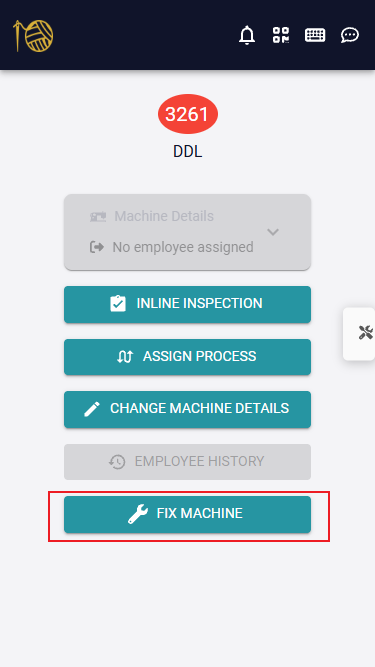
Fix Machine Flow
When the supervisor clicks Fix Machine:
-
The action behaves as if the supervisor scanned their RFID tag
-
Maintenance response time is recorded
-
The maintenance ticket status changes to Under Inspection
-
The user is redirected (same tab) to the Maintenance Request Details page
Available actions:
-
🔧 Repair Machine
-
🔁 Replace Machine
-
❌ False Alarm
Once the action is saved:
-
The maintenance request is closed
-
A resolution timestamp is recorded
🏷️ 2. Faster RFID Tag Assignment at Assigning Tags Station
The Assigning Tags Station has been optimized to significantly speed up RFID assignment.
New improvements include:
-
Displaying batch group details and group type (Bundle or Stack)
-
Allowing users to define the number of RFID tags per batch
-
Prioritizing batches that do not have all RFID tags assigned
-
Ability to expand and edit RFID tags on already-assigned batches
Sequential Assignment
Users can now click Assign Sequentially, which:
-
Starts from the first unassigned batch
-
Enables fast, continuous scanning of RFID tags without manual selection
🎯 3. Live Floor Cards Based on Targets (P2P) Instead of Efficiency
Live floor displays can now change colors based on Plan-to-Performance (P2P) instead of efficiency.
How P2P Works
-
Performance is calculated against the expected target for elapsed time
-
Example: If only 80 minutes have passed in the day, the system evaluates output against the target for those 80 minutes
-
The card color reflects whether the worker is ahead, on target, or behind
Configuration
Factories can:
-
Control P2P thresholds and color codes from Factory Settings
-
Choose per display whether cards are based on Target (P2P) or Efficiency
📦 4. Packing Details Added to PO Report
If the Packing Module is enabled, the Production Order (PO) Report now includes detailed packing insights.
New Data Points
Assortments
-
Value: Number of unique assortments in the order
-
Click → Opens assortments list filtered by this order
Boxes Breakdown
-
Fully Filled Boxes → Status = Filled
-
Partially Closed Boxes
-
Partially Open Boxes
-
Each value is clickable and opens the filtered box list
Additional Packing Insights
-
Daily packed pieces
-
Packed vs other stages comparison per color and size
These enhancements help identify delays and bottlenecks more precisely.
📊 5. Packed Pieces Card on Dashboard
A new Packed Pieces card has been added to the Dashboard, displayed alongside Inspected Pieces.
This allows managers to:
-
Instantly compare packing vs inspection output
-
Detect downstream bottlenecks faster
📦 6. View Box History Timeline
Users can now open the history timeline for any box to view:
-
All box filling events
-
Who performed each action
-
When it happened
-
Which workstation was used
This adds full traceability to packing operations.
📑 7. New Order Status Report (Production Module)
A new Order Status Report has been added to the Production Module.
Users can:
-
Select an order
-
View the status of each color–size combination inside the order
This provides a clear picture of completion progress at a granular level.
🧾 8. More Information in Batch & Batch Group Headers
Batch and batch group headers now display:
-
RFID tags
-
Color shade
From the history page:
-
Authorized users can add or edit RFID tags
-
Improves traceability and correction workflows
📉 9. Wasted Reports Header Enhancements
The Wasted Reports header has been improved:
-
Users can choose to display tiles by Total or Average
Tiles now show:
-
Number of workers who arrived late
-
Number of workers who left early
-
This removes the need to manually count records from tables.
⚙️ 10. Additional System Enhancements
🧑💼 User Management
All user changes are now logged in User Logs, including:
-
Language
-
Role
-
Homepage
-
Scope
-
Other profile updates
-
-
Full visibility into who changed what and when
💰 Bulk Salary Updates
-
Salaries can now be updated in bulk from the Users page
🧪 Quality Supervisor Performance Report
New column added before Batch Inspection Duration:
-
Piece Inspection Duration
-
-
Improves inspection efficiency analysis at the piece level
📈 Report Navigation Improvements
In Process Throughput Report and Standard Process Report:
-
Clicking an employee’s name opens their Employee History Report
✅ Summary
Release 26-04 delivers:
-
📱 Mobile-first maintenance resolution
-
🏷️ Faster RFID assignment workflows
-
🎯 Target-based live floor visibility
-
📦 Deeper packing traceability
-
📊 Stronger reporting and navigation
-
🧾 Improved auditability and transparency
All improvements are designed to keep your production data accurate, connected, and actionable, even in complex factory environments.